Verifications
Fix a failed or expired verification link
Verification Not Found means the FreeAML link does not match an open check. An expired check needs a new verification.
Updated 6 October 2026
There are two different pages your client can hit.
- On FreeAML: Verification Not Found and This verification link is invalid or has expired. The FreeAML link does not match an open verification. Check you sent it to the right person and that the verification is still on your dashboard. If it was removed, start a new verification.
- On Personr's pages: after paying, your client finishes on the secure page of our identity verification partner, Personr. The web address changes. The page shows "Powered by Personr". If they see an error or an expired message there, it comes from Personr, not FreeAML. FreeAML cannot show a length of time for that link.
A check can also show the status chip Expired, Rejected, or a declined result on your verification. Those are different from Verification Not Found.
Send the link again
- 1
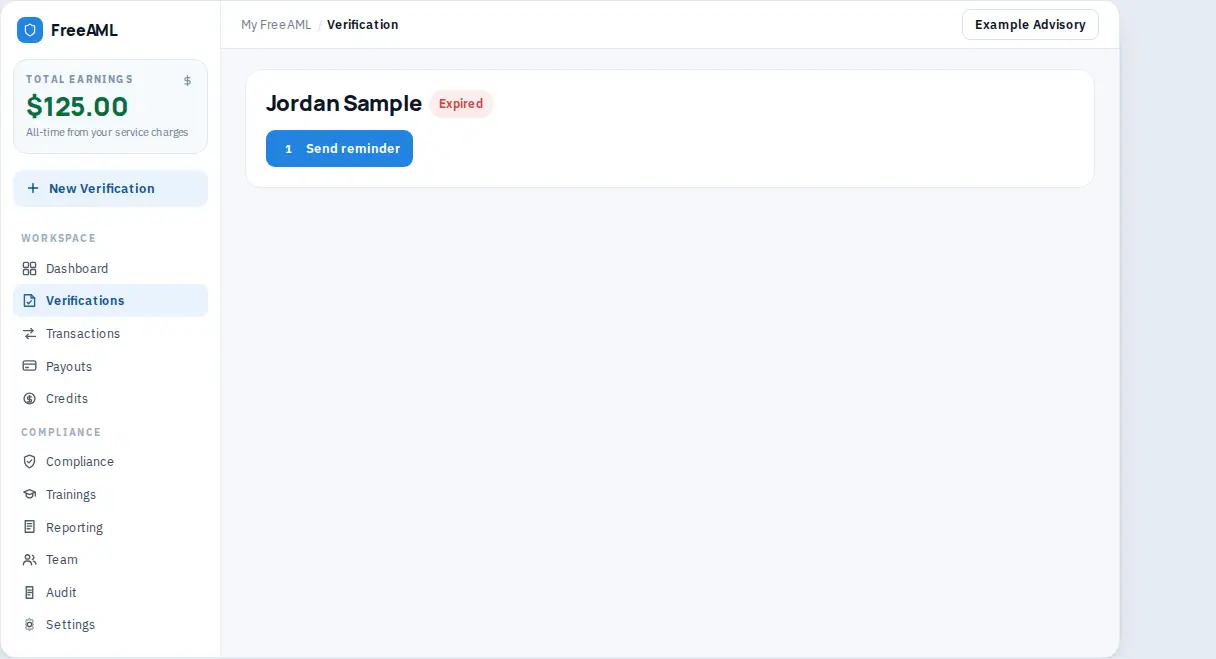
Open the verification from Verifications. Check the status chip. Expired means the check expired. In Progress or Pending means it is still open.
- 2
Select Send reminder. Your client gets the same link again. Before they have paid, the subject is Identity Verification Reminder — FreeAML and the button is Pay & Verify. After they have paid, or when you chose I'll pay, the subject is Identity Verification Required - FreeAML and the button is Verify My Identity.
- 3
When it works, you see Reminder sent. A notification can also say Verification link resent.
- 4
A reminder resends the existing link. It does not create a new one. If the status chip reads Expired, a reminder will not restart the check. Start a new verification from New Verification.
You cannot send another reminder immediately. The button shows Wait and a number of seconds. The cooldown is 60 seconds. If you try too soon, the message is Verification link already sent recently. Please wait before resending.
When reminder is not the fix
- Pay for this verification before emailing the client. You chose I'll pay and the check is still unpaid. Select Pay for this verification, then send the reminder. Until then your client sees Waiting for payment.
- No verification link is available to resend for this order yet. The link was never created. Pay first, or send the verification again from New Verification.
- Your client chose not to continue. They see Verification declined and You've chosen not to complete this verification. Sending the old link does not undo that. Start a new verification if they are ready.
- Rejected means Personr could not verify your client. The Verification failed email lists the reason. Some reasons, like a blurry photo or a missing back side, are ones a person may be able to try again for on Personr's pages, with clearer photos. Others, like a document that looks altered or a photo that does not match, end the check. FreeAML shows both as Rejected. It does not show whether a later try on those pages will change this verification. Read the result before you send anything else. If you start a new verification, it is a new check and a new charge.
- Owners pending, or a long wait on a business check, can mean Personr is still waiting on the register, or on an owner's check. See [Personr: Why is an entity stuck in pending](https://help.personr.co/en/articles/13283435-why-is-an-entity-stuck-in-pending).
If the reason is about the photos:
- Use the original document, not a photocopy or a screenshot.
- Use a colour photo with all four corners in the frame.
- Make sure the document is not expired.
- Take the selfie in good light.
How long is a verification link valid?
FreeAML does not show an expiry for the FreeAML link. Personr's page has its own time limit, which FreeAML does not display. If your client sees an expired message on Personr's pages, or the status reads Expired, start a new verification.
How do I send a new link?
Reminders go by email. Check your client's email on the verification, and use Update email on an owner if that address was wrong.