Verifications
Client pays or I'll pay
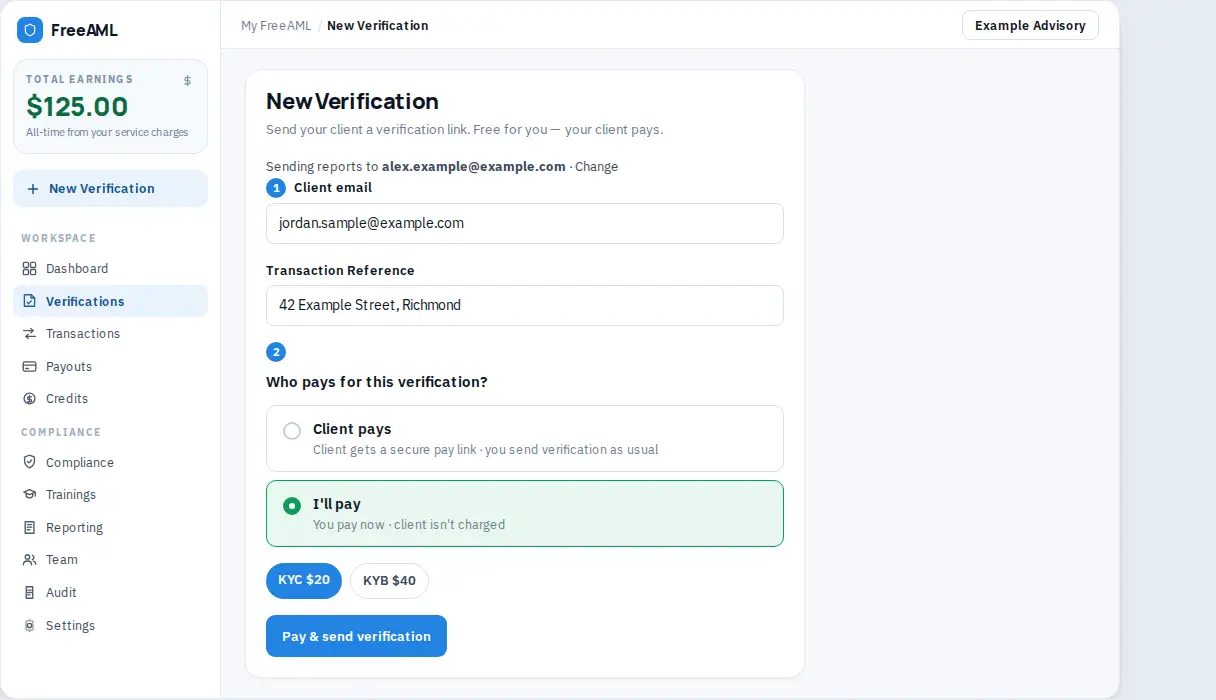
Choose who pays on the verification form. Client pays sends a pay link. I'll pay charges KYC at $20 or KYB at $40 to you.
Updated 6 October 2026
Every new verification asks Who pays for this verification? You can let your client pay, or you can pay and email them a link with nothing to pay.
Let your client pay
- 1
Open New Verification.
- 2
Select Client pays. The card says Client gets a secure pay link · you send verification as usual.
- 3
The helper reads Your client chooses KYC or KYB, pays and verifies. You get the results in email.
- 4
Select Send Verification — Free.
- 5
Your client opens the email, chooses Individual (KYC) at $20 or Company / Trust (KYB) at $40, and pays on Stripe's secure checkout.
On FreeAML they then confirm consent on Before we begin. For a company, trust, or SMSF they also enter Entity Name and ABN or ACN on Entity Details.
On Personr's pages they finish the identity check with our identity verification partner, Personr. The web address changes. The page shows "Powered by Personr". The steps are under What your client receives in Send a verification link.
A service charge, if you set one, is added on top of that price. Set your service charge explains the $0, $25, $50, and $100 options.
Pay for the check yourself
- 1
On the same form, select I'll pay. The card says You pay now · client isn't charged.
- 2
Pick KYC $20 for a person or KYB $40 for a company, trust, or SMSF.
- 3
Select Pay & send verification.
- 4
FreeAML uses credits first, then the card on file. If neither covers it, you complete payment on the pay link.
- 5
When payment is in, the verification shows Payment received. Your client has been emailed the verification link.
Your client gets Identity Verification Required - FreeAML with a Verify My Identity button and the line that the fee is already paid. On FreeAML they confirm consent on Before we begin, and for a company, trust, or SMSF they add Entity Name and ABN or ACN on Entity Details. On Personr's pages they finish the identity steps. The web address changes, and the page shows "Powered by Personr".
On Overview, Who pays reads Client or You.
The same two cards appear when you invite a beneficial owner from the Owners tab.
Does Client pays use my credits?
No. Client pays charges your client. I'll pay uses your credit balance first, then the card on file.
Can I switch who pays after I send?
Choose it before you send. Owner invites on the Owners tab ask again for that owner.