Getting started
Sign in with an email code
Open FreeAML with the email code we send you. There is no password.
Updated 6 October 2026
You sign in with the email address you use for FreeAML. We email a 6-digit code. There is no password.
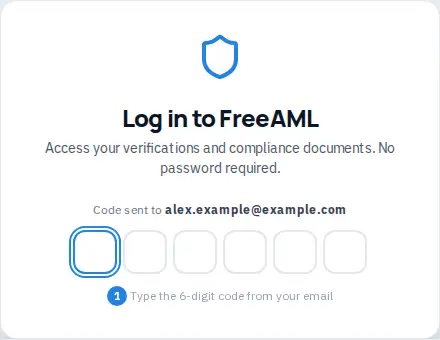
Sign in
- 1
Select Login in the site header, or open the Log in page.
- 2
Under Email, enter your address. The box shows the placeholder
you@example.com. - 3
Select Send code. The button reads Sending… while the email is on its way.
- 4
Open that email and find the 6-digit code.
- 5
Type the code into the six boxes. FreeAML checks it when the sixth digit is in. You will see Verifying...
- 6
You land on your dashboard at My FreeAML. If you were trying to open a page inside the app, you return there instead.
If the code does not work
- That code is incorrect. Try again. Check the latest email. An older code will not work.
- That code has expired. Request a new one. Select Resend code. If the button is not ready, it shows Resend code in a few seconds.
- Use a different email if you typed the wrong address.
- Enter a valid email address. appears if the address is not a complete email.
- Enter the 6-digit code. appears if you submit before all six boxes are filled.
Under the code boxes, ToS and Privacy Policy open the terms and privacy pages.
How do I get the sign-in code?
We email it to the address you entered. There is no password.
Where do I go after I sign in?
You open the dashboard. The sidebar lists Verifications, Payouts, Credits, Compliance, Trainings, Reporting, Team, Audit, and Settings.