Team and workspaces
Team roles
Admin, Workspace admin, Compliance, and Staff. The invite form shows what each role can do, including credits, payouts, and verifications.
Updated 6 October 2026
The invite form on Team includes What this role can do. The columns are Admin, Compliance, and Staff. A tick means they can do it. Read means they can view it. A dot means they cannot.
Workspace admin uses the Admin column, with one limit: they cannot archive the team or transfer ownership. The invite form says a workspace admin runs the team and cannot archive it or transfer ownership.
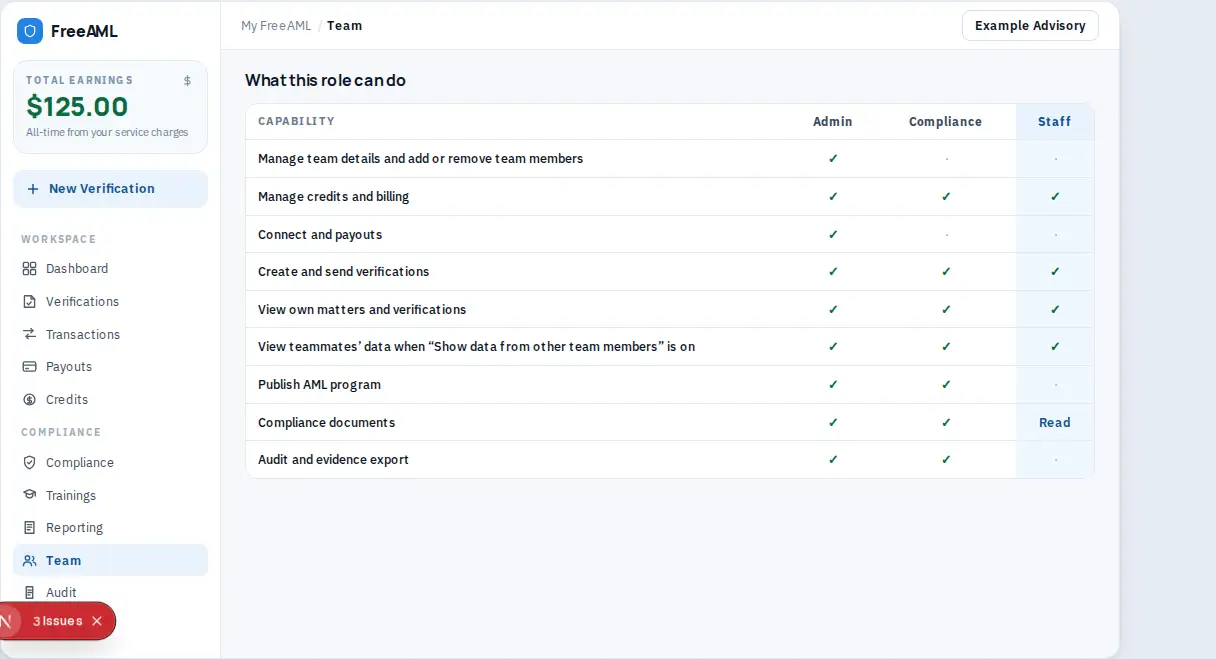
What each role can do
- 1
Open Team and start an invite so the table is on screen. You do not have to send the invite to read it.
- 2
Select the role you want to understand.
- 3
Read the rows:
- Manage team details and add or remove team members. Admin only.
- Manage credits and billing. Admin, Compliance, and Staff.
- Connect and payouts. Admin only.
- Create and send verifications. Admin, Compliance, and Staff.
- View own matters and verifications. Admin, Compliance, and Staff.
- View teammates' data when "Show data from other team members" is on. Admin, Compliance, and Staff.
- Publish AML program. Admin and Compliance.
- Compliance documents. Admin and Compliance can manage them. Staff can read them.
- Audit and evidence export. Admin and Compliance.
- 1
Remove on a verification is limited to Admin and Workspace admin, even though Staff can send checks.
On the roster, a legacy admin seat can show Cannot archive the team or transfer ownership. A legacy compliance seat can show Read and evidence export. New invites use Admin, Workspace admin, Compliance, and Staff.
Who connects the payout bank?
Admin. The Connect and payouts row is Admin only. Other roles see A team admin connects the payout bank account.
Can Staff buy credits?
The role table includes Manage credits and billing for Staff. If the Credits button is disabled and reads Owner or compliance officer, that seat does not have billing permission on this team.