Verifications
Remove a verification
Owners and admins can remove a verification from the dashboard. This does not refund a payment.
Updated 6 October 2026
Remove takes a verification off your dashboard. Only an Admin or a Workspace admin sees the button. Compliance and Staff do not.
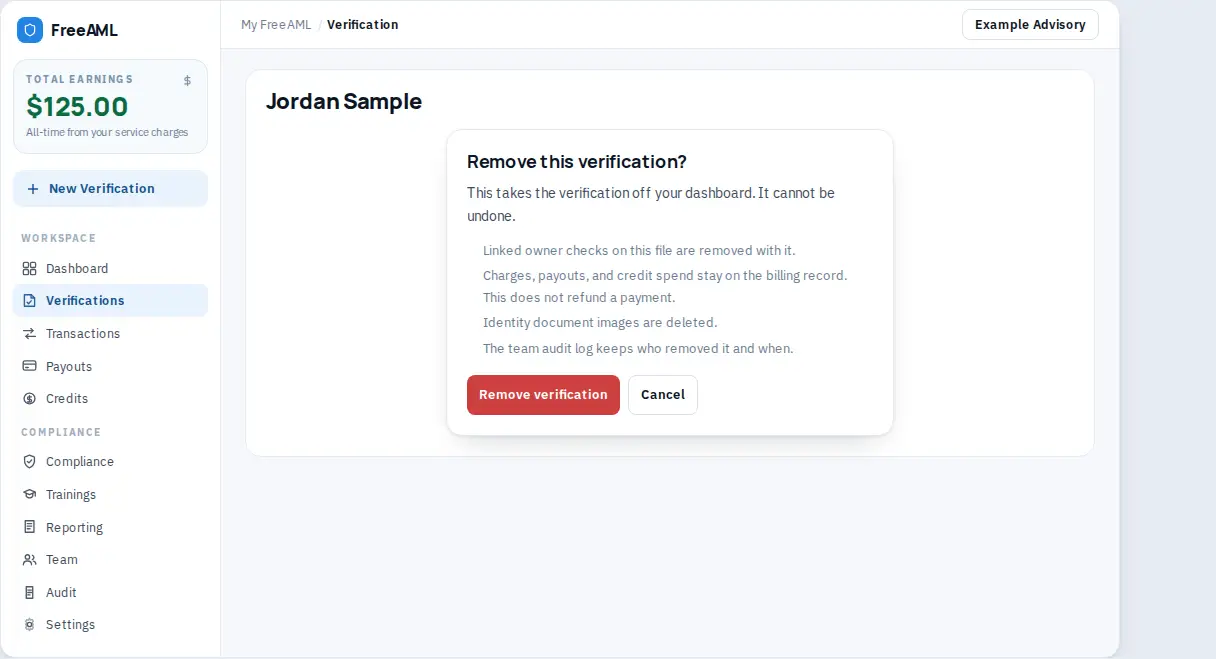
Remove it
- 1
Open the verification, or use the compact Remove control on the verification list.
- 2
Select Remove.
- 3
Read the dialog Remove this verification? The warning says This takes the verification off your dashboard. It cannot be undone.
- 4
The dialog also says:
- Linked owner checks on this file are removed with it. - Charges, payouts, and credit spend stay on the billing record. This does not refund a payment. - Identity document images are deleted. - The team audit log keeps who removed it and when.
- 1
Select Remove verification. The button reads Removing… while it runs. Cancel closes the dialog.
- 2
You return to Verifications.
If it fails, you see Could not remove the verification.
I cannot see Remove.
Your role cannot delete verifications. Ask an Admin or a Workspace admin. The button is also hidden after the verification is already removed.
Does the audit trail forget the check?
No. The audit log keeps who removed it and when.