Payouts and billing
Connect your bank for payouts
Service charges sit on your FreeAML balance until you add bank details. Stripe Connect is only used to pay that balance to your bank.
Updated 6 October 2026
Service charges accrue on your FreeAML balance before any bank is connected. Connecting a bank is how you withdraw. FreeAML does not ask you to type an account number into FreeAML. The button opens Stripe Connect, and the bank account stays there.
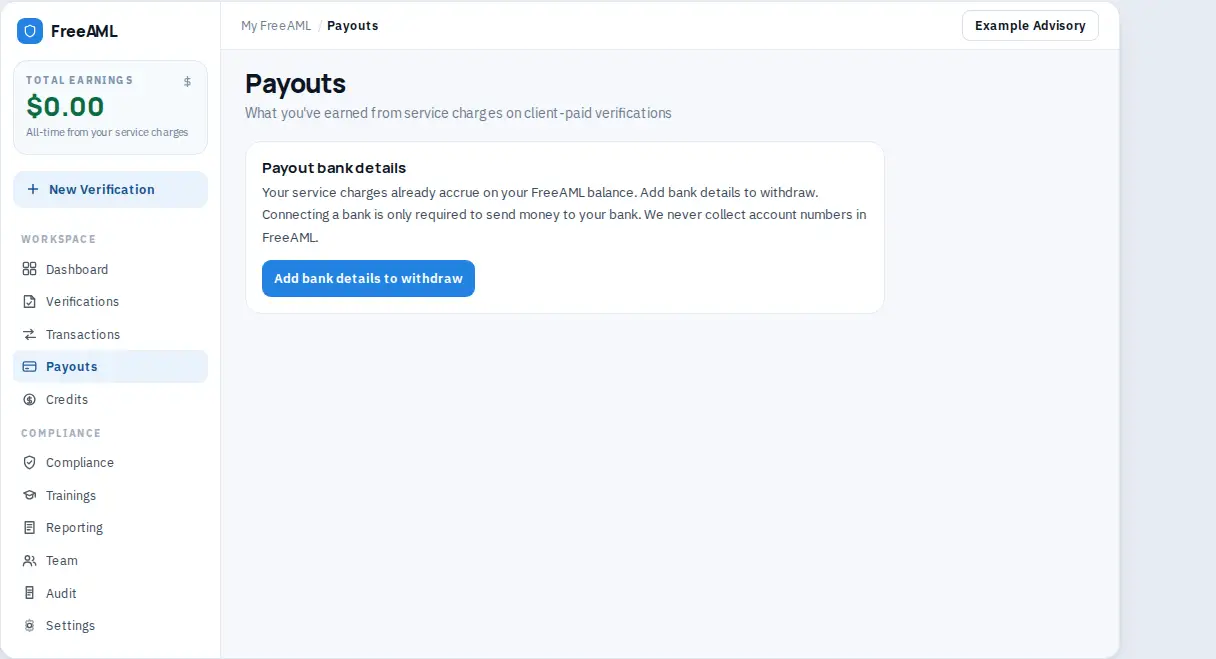
Connect the bank
- 1
Open Payouts. The subtitle is What you've earned from service charges on client-paid verifications. You can also start from Add bank details to withdraw on the Total earnings card in the sidebar, or from Settings under Markup payouts.
- 2
Read Payout bank details. The text says your service charges already accrue on your FreeAML balance, and that Stripe Connect is only required to send money to your bank.
- 3
Select Add bank details to withdraw. If a bank is already connected, the button is Update bank details.
- 4
The button reads Redirecting… while Stripe opens. Finish the bank steps there.
- 5
You return to Payouts. A green banner says Stripe Connect updated and Markup payouts will go to the bank account on file in Stripe.
Total earned then uses the hint All-time from your service charges. Before the bank is connected, that hint says the amount is available on your FreeAML ledger and that you connect your bank to withdraw.
There is no separate Withdraw button on the page. Connecting the bank is what allows money to be sent to the account on file.
Only someone allowed to manage payouts sees the button. If you do not, the page says A team admin connects the payout bank account.
Do I type my account number into FreeAML?
No. The Payouts page says FreeAML never collects account numbers. You add them in the Stripe Connect window.
Who can connect the bank?
An admin who is allowed to manage payouts. Compliance and Staff do not get the button. The role table is in Team roles.