Verifications
Verify a company
Your client chooses Company / Trust (KYB), pays $40, then enters the entity name and ABN or ACN. You review owners on the verification.
Updated 6 October 2026
A company check is a KYB verification. The price is $40, before any service charge you add. Beneficial owner checks found during the company check are $20 per person and are charged separately.
You still start from New Verification. Your client chooses the company path on the link when they are paying.
Ask your client to verify the company
- 1
Send a verification link with Client pays selected.
- 2
On FreeAML. Your client opens the email and selects Company / Trust (KYB), Verifying a business or trust. The screen notes that beneficial owner checks are charged separately per person if owners are found.
- 3
They pay $40 (plus any service charge) on Stripe's secure checkout, then tick the consent box on Before we begin.
- 4
On Entity Details they enter Entity Name and ABN or ACN, then Continue. The placeholders look like
e.g., ABC Pty Ltd, Smith Family Trustande.g., 12 345 678 901. - 5
On Personr's pages. FreeAML moves them to our identity verification partner, Personr, to finish the business check. The web address changes. The page shows "Powered by Personr". Personr checks the entity against the company register and looks up its owners. What Personr asks your client for on those pages depends on the entity.
- 6
Open the verification from Verifications. The tabs are Overview, Entity, Owners, Structure, and Audit.
If you are paying, select I'll pay, choose the KYB $40 chip, and select Pay & send verification. Your client still receives the link by email. They are not charged. They still confirm consent on FreeAML, enter entity details, then move to Personr's pages.
When your client is asked about owners
When the company check is approved and owners are found, FreeAML emails your client. The subject is Beneficial owners detected and the entity name. The button is Review beneficial owners. That opens FreeAML's Beneficial owners detected page. They tick owners. Owners marked Required stay ticked. They enter an email for each, and an ABN or ACN for an entity owner. Then they select Send verification links, or I don't want to provide beneficial owner details.
You also get an email with a Review beneficial owners button. When owner checks are still open, the subject starts with Action required — and your client's email. If you set a reference, the subject is Action Required - Reference and that reference. The heading in the email is Verification complete — review required.
You can also do this yourself on Owners.
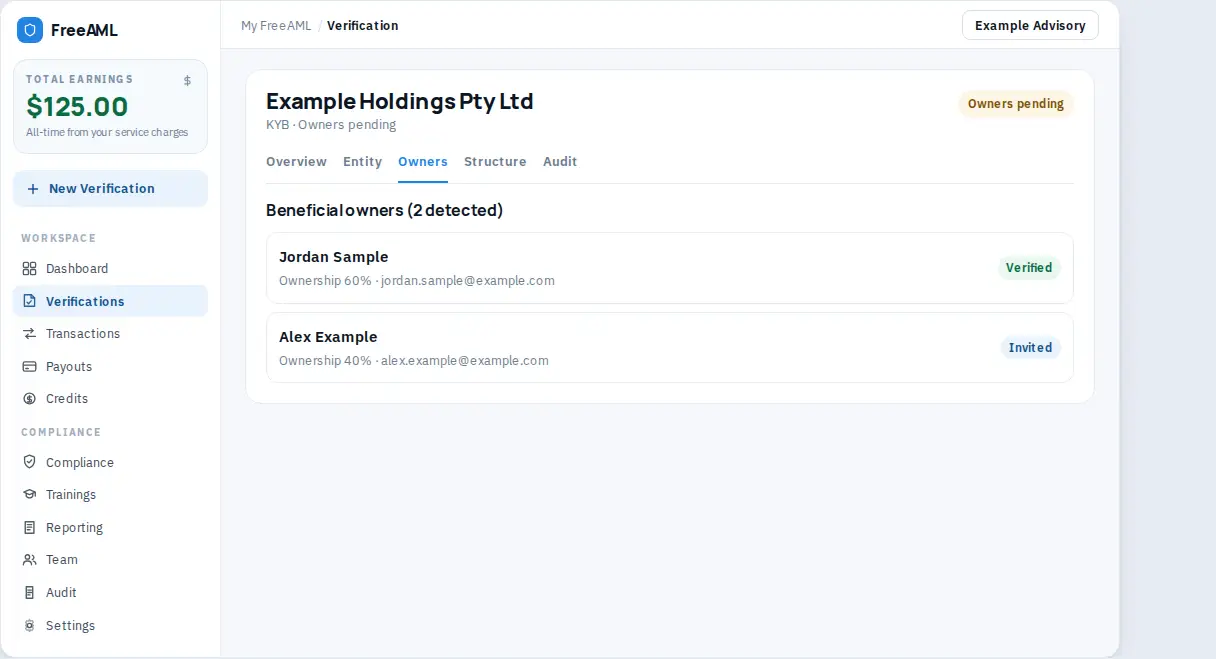
Review owners
On Owners the heading is Beneficial owners with the number detected. Each person or entity has a chip:
- Verified
- Invited
- In progress
- Detected
- Rejected
Each owner gets their own email link. They go through the same steps as a personal check: FreeAML first, then Personr's pages for their ID and liveness.
To check someone who is still outstanding:
- 1
Open Owners.
- 2
Enter their Email. For an entity owner, enter ABN or ACN.
- 3
Choose Client pays or I'll pay.
- 4
Select Send verification or Pay & send verification.
Linked UBO checks lists checks you have already started. Open linked check opens one. Send reminder, Update email, and Update and resend are on that owner when a link has already gone out.
The Entity tab is labelled Entity verification details. It shows Entity name, Registration no., and the verification result, including Applicant status and Review decision.
Where do I type the ABN?
Your client types the entity name and ABN or ACN on the link, on Entity Details, after they pay. You do not type them into New Verification.
How much is a beneficial owner check?
$20 per person, charged separately from the $40 company check.