Verifications
Review a monitoring alert
Ongoing monitoring can flag a possible match after a check is complete. The verification stays complete. You review it and record your own enhanced due diligence.
Updated 6 October 2026
Ongoing monitoring is included with a check. There is no switch in the app to turn it off. If a later screening finds a possible match, you get an alert. The original verification stays Complete. FreeAML does not decide whether the match is the same person or entity. You review it and document your own enhanced due diligence.
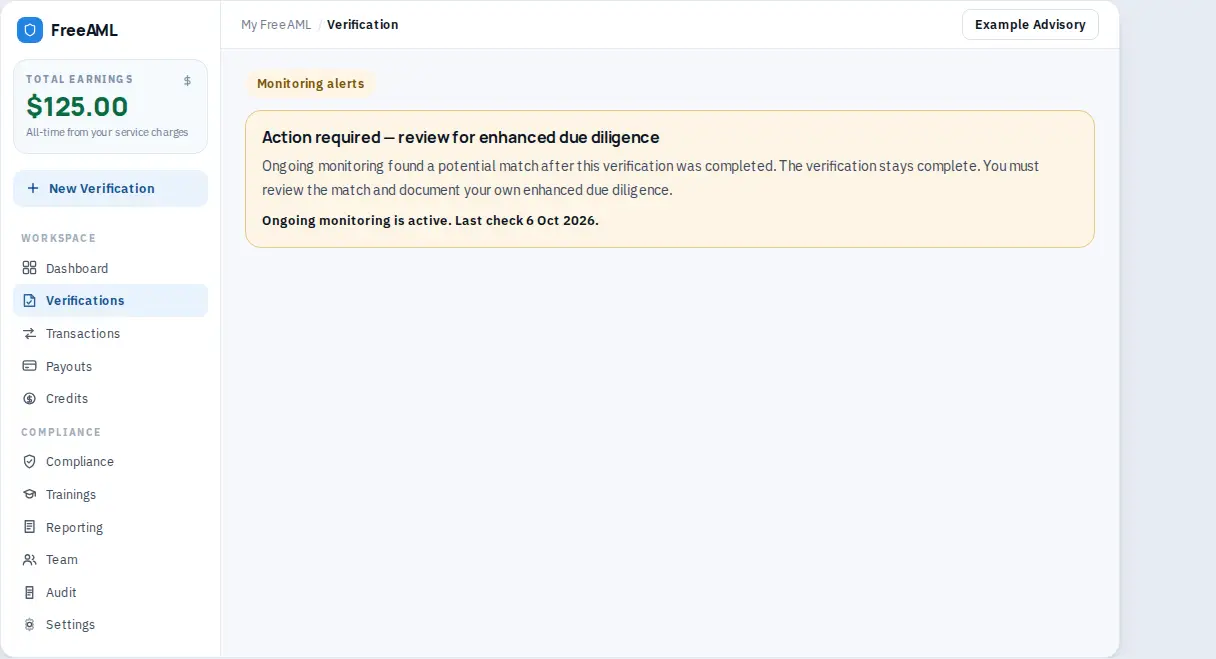
Find the alert
- 1
Open Verifications.
- 2
Select the filter Monitoring alerts. Rows with a hit show an AML alert badge.
- 3
If nothing is listed, the empty state says No monitoring alerts and No completed verifications have a later AML monitoring alert.
- 4
Open the verification. The panel title is Action required — review for enhanced due diligence.
- 5
Read the explanation: ongoing monitoring found a potential match after the verification was completed. The verification stays complete. You must review the match and document your own enhanced due diligence.
- 6
If monitoring is still running you also see Ongoing monitoring is active, plus Last check and Last change when those times are known.
The same text can appear under outstanding actions. The bell notification is titled AML monitoring alert and links to that verification. It says the check has a new potential AML match and that the verification stays complete.
Does an alert undo a completed check?
No. The status stays Complete. The alert is a later review task.
Where do I turn monitoring off?
You cannot. Completed checks stay in ongoing monitoring. Use the Monitoring alerts filter to see what needs a look.