Compliance
Staff training and certificates
Open Trainings, finish a module, pass the quiz, and download the certificate. Progress is saved in this browser.
Updated 6 October 2026
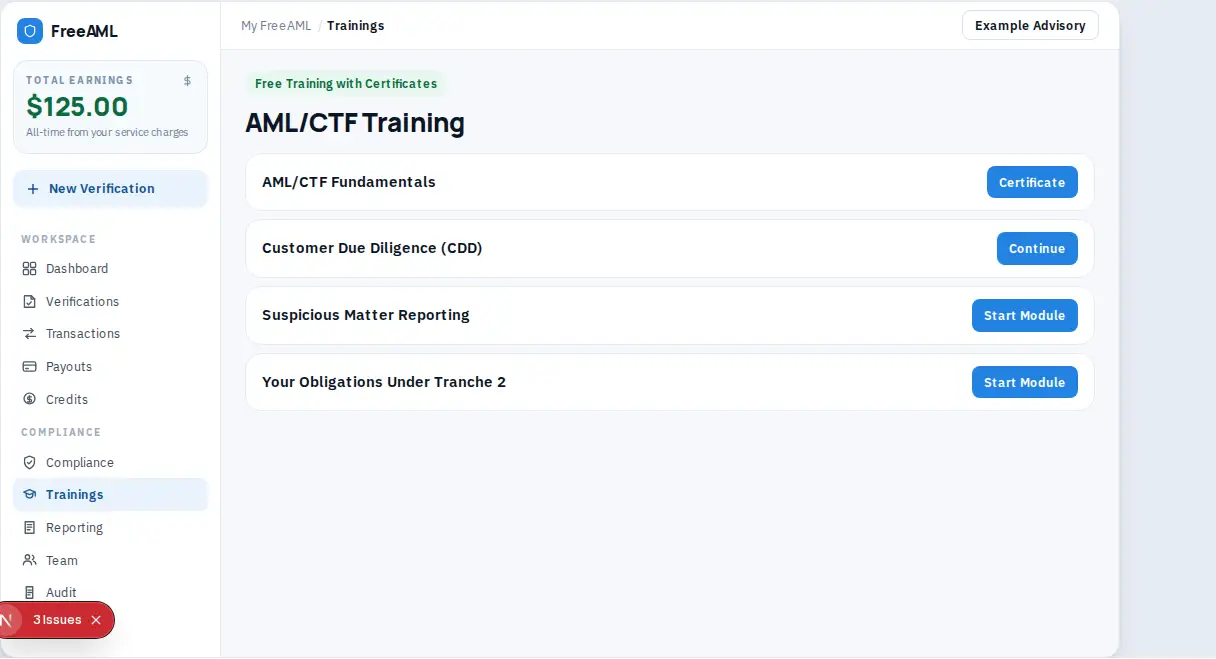
Trainings in the sidebar opens AML/CTF training. The heading is AML/CTF Training and the badge reads Free Training with Certificates. Each person signs in and completes the modules in their own browser. Progress is stored in that browser.
Complete a module
- 1
Open Trainings.
- 2
Pick a module:
- AML/CTF Fundamentals - Customer Due Diligence (CDD) - Suspicious Matter Reporting - Your Obligations Under Tranche 2
- 1
Select Start Module. If you have already begun, the button is Continue.
- 2
Read the module, then open the quiz and submit your answers.
- 3
When you pass, select Certificate or Review.
- 4
On the certificate page, select Download Certificate.
The page includes a note titled Training is Mandatory. It says staff involved in designated services must complete AML/CTF training, that training records must be kept for 7 years, and that annual refresher training is required. It also says this training is not legal advice and is not an accreditation.
Where do I send the certificate?
Download it and keep it with your training records. FreeAML does not lodge it with AUSTRAC.
Can I skip the quiz?
No. The certificate follows the quiz for that module. Use Review if you want to read the module again after you finish.