Compliance
Create your AML/CTF program
Generate the program from Compliance, then publish a version. Staff can read documents. Admin and Compliance can publish.
Updated 6 October 2026
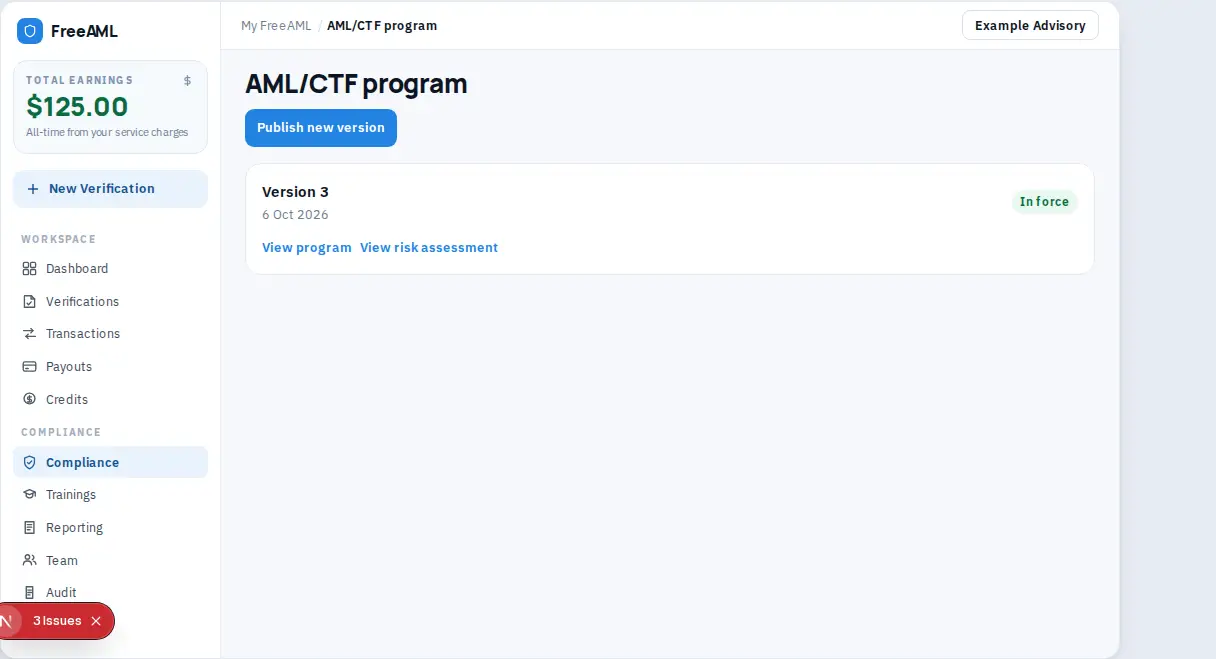
Your AML/CTF program is created as a document, then published as a version your team can open later. Generation starts from Compliance. Publishing is on AML/CTF program.
Generate and publish
- 1
Open Compliance. The page title is Team compliance documents.
- 2
Select Create AML program. This opens the generator. You need to be signed in. If documents already exist, you can also select Open program versions.
- 3
Complete the generator and save. The compliance page can list an AML/CTF Program card. You can print it from the browser.
- 4
Open AML/CTF program from Open program versions.
- 5
Select Publish new version. The button reads Publishing… while it saves. Links on that page include Compliance documents and Create AML program.
- 6
On a version, use View program or View risk assessment. Status chips are In force, Published, and Draft.
If you only have a personal seat, the program page says Start your team. Versions need a shared team. Create the team, then come back.
Download All (ZIP) on Compliance is the Audit-Ready Export. It reads Preparing... while the file builds. Older copies are under View Archives.
Admin and Compliance can publish. Staff can read compliance documents. The role table is in Team roles.
I cannot see Create AML program.
That action is for an owner, compliance role, or workspace admin. Staff can read documents that are already there.
What is In force?
It is the version status chip for the program version currently in force. Draft and Published are the other chips.